
Numpy was created in 2005 by Travis Oliphant. It is an open source project. It stands for numerical python.NumPy is a Python library and is written partially in Python, but most of the parts that require fast computation are written in C or C++.
The source code for NumPy is located at this github repository numpy_github
Why we use numpy array instead of lists.
In python we have lists that serves the purpose of arrays but they're slow in process.
In terms of Memory Layout
Python list stores references (pointers) to python object not the value directly and each containing some of things like
- value (value of the element)
- type Information (int, str, float, double ...)
- reference count
- and other metadatas
This means there's an extra memory usage, more cache misses, and extra pointer for derefrencing. Whereas numpy array stores contiguously gave the benefits like cpu caches works efficiently, no pointer chasing, and uses less memory.
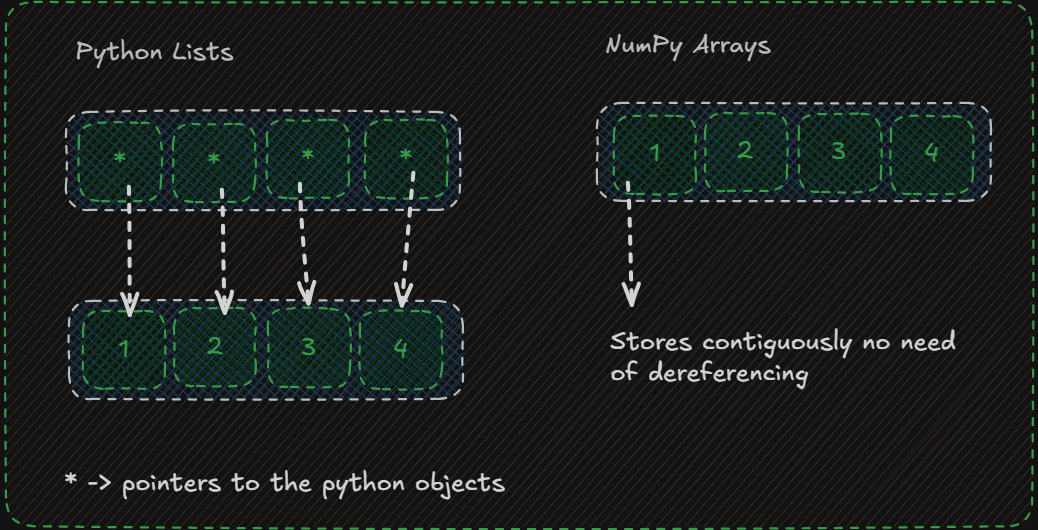
In terms of iterating over it
for every iteration python lists fetch the object, then checks it's type and then performs the operations. Thousands or millions of interpreter instructions executed in this.
In Numpy arrays the loops run in the compiled code which is return in c, avoiding python interpreter instructions overhead which makes it fasts.
Vectorization
NumPy achieves near-instant computation on massive datasets due to three main internal designs:
- Compiled C Code: The execution skips Python's slow, line-by-line interpretation overhead.
- Contiguous Memory: NumPy arrays store identical data types packed closely together in memory, allowing your CPU to fetch data much faster than a standard Python list can.
- SIMD Hardware Acceleration: It leverages Single Instruction, Multiple Data (SIMD) processor instructions to complete several math operations in a single CPU clock cycle.
loops are slow then numpy Vectorization
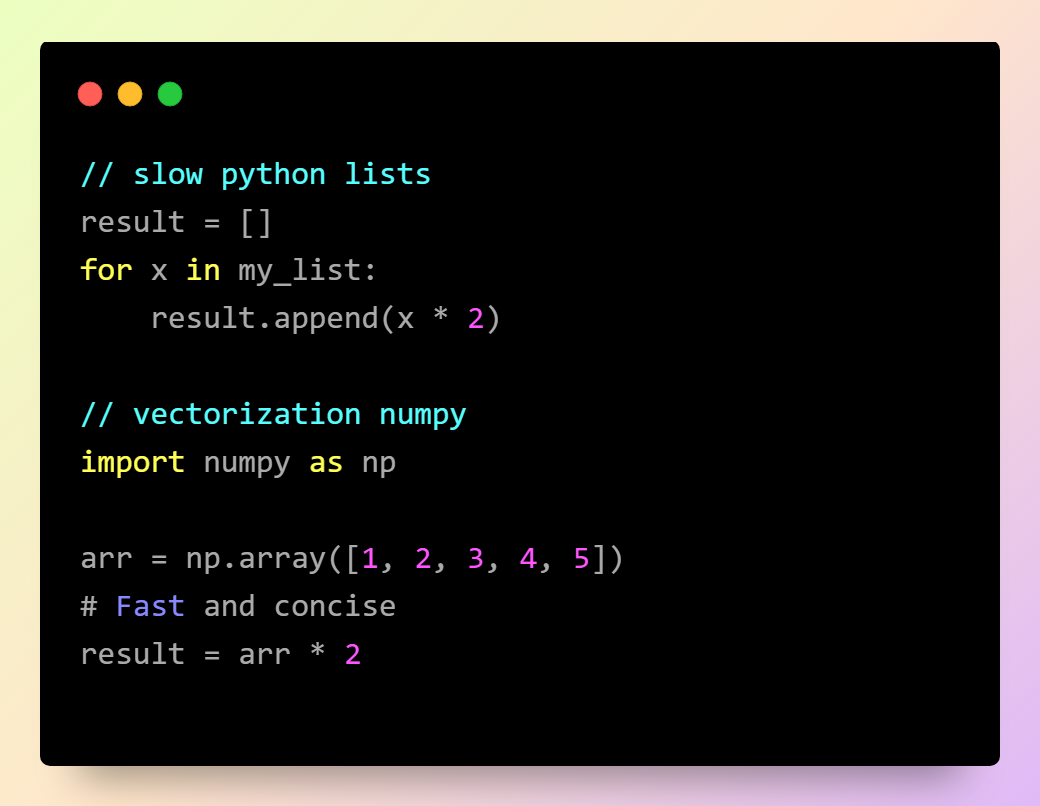
Memory Comparison
In a 64 bit System one pointer is almost 8 bytes . Suppose there are 1_000_000 elements so 1_000_000 pointers so the size will 1_000_000 * 8 that is 8_000_000 bytes and roughly around 8 MBs . And size of integer in Python object is 28 bytes which 28_000_000 bytes hence which approximates to 27 MBs and it sum ups to 35 MBs
And Numpy uses int64 which is roughly around 8 bytes not pointers and python objects. And after all the calulations it sums up to 8 MBs only
Hence Python lists of 1_000_000 elements consumes roughly around 35 MBs Whereas NumPy takes only 8 MBs
# You can check it on your own system.
import sys
import numpy as np

print(sys.getsizeof(0))              # Size of one Python int
print(sys.getsizeof([]))             # Empty list
print(sys.getsizeof([1]))            # List with one pointer
print(np.array([1], dtype=np.int64).itemsize)  # Bytes per NumPy element
NumPy is often 10–50× faster for numerical operations, depending on the hardware and operation.
Installation of NumPy
pip install numpy Import NumPy
import numpy

arr = numpy.array([1, 2, 3, 4, 5])

print(arr)
Now is imported and it is ready to use.
Create a NumPy ndarray Object
The array object in numpy is called numpy.ndarray. You can create a numpy array using numpy.array() function.
import numpy as np

array: np.ndarray = np.array([1, 2, 3, 4, 5])
print(array)
print(type(array))[1 2 3 4 5]
<class 'numpy.ndarray'>We can initialize NumPy arrays from (nested) lists and tuples, and access elements using square brackets as array subscripts (similar to lists in Python).
Shape Size & Dimensions in NumPy Arrays
- A NumPy array is a grid of values, all of the same type, and is indexed by a tuple of non-negative integers.
- The rank of an array is the number of dimensions it contains.
- The shape of an array is a tuple of integers giving the size of the array along each dimension.
- The size of an array is the number of elements it contains (which is equivalent to np.prod(
<ndarray>.shape), i.e., the product of the array’s dimensions).
0-Dim Arrays
0-D Arrays are also called scalars, Each value in the array is a 0-dim array.
arr = np.array(23)
print(arr)
1-Dim Arrays
1-D Arrays are also called Basic Arrays, it is the collection of multiple 0-Dim arrays. These are the most common basic arrays. It is uni-dimensional in nature.
arr = np.array([23, 1, 32, 2, 3])
print(arr)[23, 1, 32, 2, 3]Ques :: create an array of 3, 4, 52, 12, 1 ?
2-Dim Arrays
An array that has 1-D arrays as its elements is called a 2-D array. Then often used to represent a matrix with a row & column. It is also called a 2nd order Tensor.
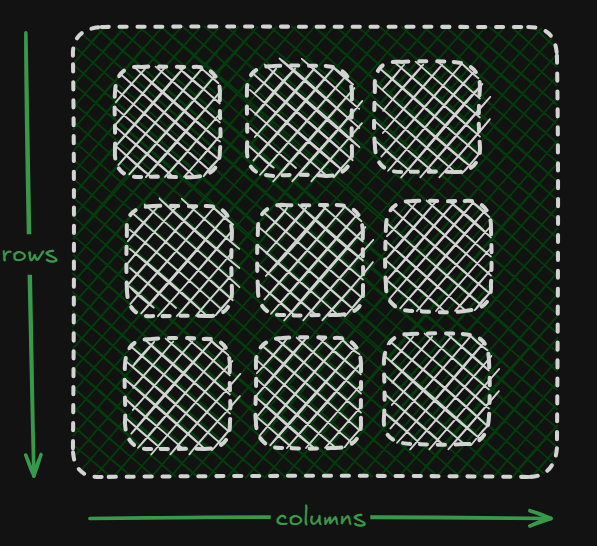
import numpy as np

arr = np.array([[1, 2, 3], [4, 5, 6]])
print(arr)[[1, 2, 3],
[4, 5, 6]]3-Dim arrays
An array that has 2-D arrays (matrices) as its elements is called 3-D array. These are often used to represent a 3rd order tensor.
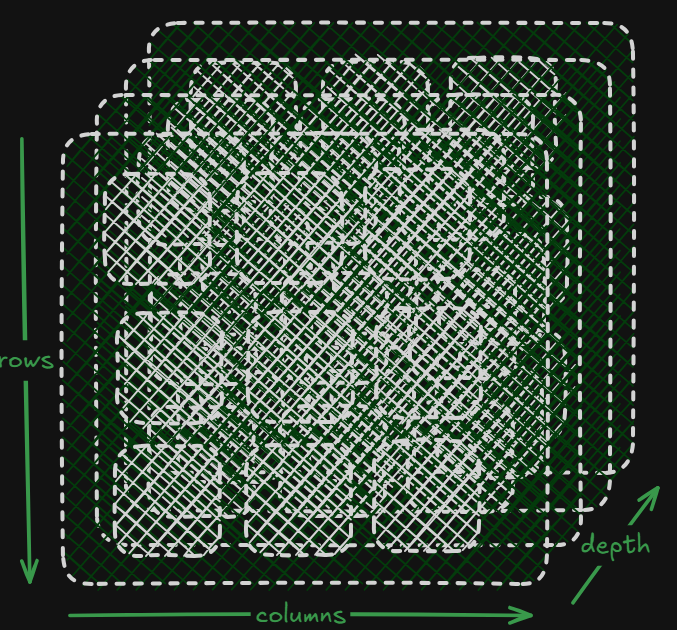
import numpy as np
arr = np.array([[[1, 2, 3], [4, 5, 6]], [[1, 2, 3], [4, 5, 6]]])
print(arr)[[[1, 2, 3],
[4, 5, 6]],
[[1, 2, 3],
[4, 5, 6]]]Check Number of Dimensions of these tensors?
import numpy as np

a = np.array(42)
b = np.array([1, 2, 3, 4, 5])
c = np.array([[1, 2, 3], [4, 5, 6]])
d = np.array([[[1, 2, 3], [4, 5, 6]], [[1, 2, 3], [4, 5, 6]]])

print(a.ndim)
print(b.ndim)
print(c.ndim)
print(d.ndim)
Set ndim argument to create higher dimension tensors or arrays.
it will create an tensor of 5 dimension which looks like [[[[[1, 2, 3, 4, 5]]]]]*
np.array([1, 2, 3, 4, 5, 6], ndim=5)learn with visualization about tensors. Click here.
Indexing in a NumPy Array
for 1-dim
All dimensions index will start from zero goes up to n. You can use negative indexing similiarly you use with python lists.
arr[index]for 2-dim
arr[row_index, column_index]for 3-dim
arr[row_index, column_index, depth_index]Slicing in a NumPy Array
Slicing can be done with the three parameter start : end : stop -> then end index is explicit. You can apply this slicing for every dimension.
for single dimension
arr[start_index:end_index:step_size]for multiple dimenesions
arr[start_index:end_index:step_size, start_index:end_index:step_size, .....]Data Types in NumPy library
Below is a list of all data types in NumPy and the characters used to represent them.
- i - integer
- b - boolean
- u - unsigned integer
- f - float
- c - complex float
- m - timedelta
- M - datetime
- O - object
- S - string
- U - unicode string
- V - fixed chunk of memory for other type ( void )
You can check the type of the data using a property knows as dtype
arr = np.array([1, 2, 3, 4])
print(arr.dtype)int64You can use dtype parameter in np.array() to assign a datatype to the array.
arr = np.array([1, 1.1, 2, 3], dtype='S')
print(arr)
All the elements datatype in the array is string here.
[b'1' b'1.1' b'2' b'3']Converting DataType when Existing array is present
you can convert the datatype of an Existing arrary using astype() method like arr.astype(datatype)
np.array([1.5, 2.1, 3.2, 4.5]).astype(int)Copy and View in a NumPy Array
The main difference between copy and view is that while copy it creates a new array and view uses the view of the same array.
In copy it owns the data and if any changes were made it will not affect the original array and vice versa. base attribute absent in copy.
In view it doesn't owns the data and if any changes were maded it the it will affect the original array because it contains the base attribute.
import numpy as np

arr = np.array([1, 2, 3, 4, 5])
x = arr.copy()
y = arr.view()
print(x.base)
print(y.base)
None
[1 2 3 4 5]As copy doesn't contains the base attribute it will throw None for x.base and it throw the original array for y.base.
NumPy Array Shape
The shape of the array is the total number of elements you find in each dimessions of the tensor. It's an attribute of a numpy array which can be accessed directly to get the shape of the array. It returns a tuple that throws each index with the number of coressponding elements of each dimension map with the index.
print the shape of 3D Array
import numpy as np

three_d_array = np.array([[[1, 2, 3], [4, 5, 6]], [[7, 8, 9], [9, 10, 10]]])
print(three_d_array.shape)(2, 2, 3)It has 2 blocks that means depth of 2, and each block has 2 rows, and each rows has 3 columns. Every index tell us the number of elements of the coressponding dimension
Reshaping an Existing Array
Reshaping is used when we need to change the dimension of array from one dimenesion to another dimension. It will change the number of elements in the dimension. While reshaping we need to take care the total number of elements and the values should remain intacted.
Reshaping an array means changing its rows and columns without altering the data inside it. You do this to format data for machine learning models or math functions. The total number of elements must always stay the same.
In Python, you can use the reshape() method to change a flat list (1D) into a grid (2D). For example, if you have 6 numbers, you can arrange them into 2 rows and 3 columns.
import numpy as np

# Create a 1D array with 6 numbers
original_array = np.array([1, 2, 3, 4, 5, 6])

# Reshape it to have 2 rows and 3 columns
reshaped_array = original_array.reshape(2, 3)

print(reshaped_array)[[1 2 3]
[4 5 6]]"-1" Trick in Reshpaing a numpy array
If you do not want to calculate every dimension you can directly use -1 it automatically calculates for the dimensions such that numbers of elements be the same. Numpy will automatically figure out the missing value.
# Automatically calculate columns (-1) to make 3 rows
new_array = original_array.reshape(3, -1)
print(new_array)[[1 2]
[3 4]
[5 6]]reshaping a 1D array to 3D array
1-D array contains 12 elements and to distribute it in 3 -> we can do (2, 2, 3 ) -> depth of 2, every block has 2 rows with every rows has 3 columns.
import numpy as np

arr = np.array([1, 2, 3, 4, 5, 6, 7, 8, 9, 10, 11, 12])
newarr = arr.reshape(2, 3, 2)
print(newarr)
[[[ 1 2 3]
[ 4 5 6]]
[[ 7 8 9]
[10 11 12]]]Iterating with NumPy Arrays
Iterating means going to every element of the array one by one. If we iterate on a n-D array it will go through n-1th dimension one by one.
Iterating 1D Array
import numpy as np

arr = np.array([1, 2, 3])

for x in arr:
  print(x)
Iterating 2-D Array
import numpy as np

arr = np.array([[1, 2, 3], [4, 5, 6]])

for x in arr:
  print(x)
Joining NumPy arrays
Joining basically either you extend one array with the other or you take all the elements of both the arrays and put that down into a single array. In NumPy arrays we join arrays with help of the axes.
Concatenate() function
if axis is not explicitly passeed the default is zero.
import numpy as np

arr1 = np.array([1, 2, 3])
arr2 = np.array([4, 5, 6])

arr = np.concatenate((arr1, arr2))
print(arr)
Join arrays using stack functions.
Stacking is as similar as concatenation the only major difference is stacking place only alag one axis, but the main difference is that stacking joins arrays along a new axis, whereas concatenation joins arrays along an existing axis.
import numpy as np

a = np.array([1, 2, 3])
b = np.array([4, 5, 6])

np.stack((a, b))array([[1, 2, 3],
[4, 5, 6]])Joining along rows
You use hstack() to horizontally join two Arrays together.
import numpy as np

arr1 = np.array([1, 2, 3])
arr2 = np.array([4, 5, 6])

arr = np.hstack((arr1, arr2))
print(arr)[1 2 3 4 5 6]Joining along columns
You use vstack() to vertically join two arrays together.
import numpy as np

arr1 = np.array([1, 2, 3])
arr2 = np.array([4, 5, 6])

arr = np.vstack((arr1, arr2))
print(arr)[[1 2 3]
[4 5 6]]Joining along depth
You use dstack() to join it along depth axis.
import numpy as np

arr1 = np.array([1, 2, 3])
arr2 = np.array([4, 5, 6])

arr = np.dstack((arr1, arr2))
print(arr)[[[1 4]
[2 5]
[3 6]]]Splitting a NumPy Array
Splliting a array is the opposite of concatenating arrays. Using array_splitter() in numpy we split the arrays accordingly.
numpy.array_split(ary, indices_or_sections, axis=0)ary: The source array you want to divide. It accepts array-like structures (e.g., lists, tuples, or existing ndarray objects).
indices_or_sections : Determines how the array is split. It accepts two types of inputs
- Integer (N): The array is divided into N sub-arrays. If the total length cannot be divided equally, it distributes the remainder elements to the first few sub-arrays so they differ by at most 1 element.
- 1D Array or List of Integers: Specifies the exact entry indices where the splits occur. For example, [2, 5] splits a 1D array into ary[:2], ary[2:5], and ary[5:]
axis (Optional, default=0) : The dimension along which to split the array
- axis=0 splits vertically (along the rows)
- axis=1 splits horizontally (along the columns).
Returns a list of sub-arrays representing views into the original array.
How split is performed:
Splits Base size : absolute(( Number of elements ) / indices) -> No. of elements each array contains.
Remainder : ( Number of elements ) % indcies -> no. of extra elements (n)
first n sections will have base + 1 elements.
And remaining sections get Base size elements each.
import numpy as np

arr = np.arange(7)  # [0, 1, 2, 3, 4, 5, 6]
result = np.array_split(arr, 5)

print(result)[array([0, 1]), array([2, 3]), array([4]), array([5]), array([6])]- Splitting
- Total Elements ((L)): 7
- Number of Sections ((N)): 5
- Base Size ((q)): 7 // 5 = 1 element per section.
- Remainder ((r)): (7 mod 5 = 2) extra elements.
- Distributing the Remainder
NumPy distributes the 2 extra elements one by one to the first sections until it runs out.
- First 2 sections get: Base Size (1) + 1 remainder = 2 elements each
- Remaining 3 sections get: Base size = 1 element each
Use the hsplit() method to split the 2-D array into three 2-D arrays along columns.
import numpy as np

arr = np.array([[1, 2, 3], [4, 5, 6], [7, 8, 9], [10, 11, 12], [13, 14, 15], [16, 17, 18]])
newarr = np.hsplit(arr, 3)
print(newarr)
Note: Similar alternates to vstack() and dstack() are available as vsplit() and dsplit().
Split the 2-D array into three 2-D arrays along columns.
import numpy as np

arr = np.array([[1, 2, 3], [4, 5, 6], [7, 8, 9], [10, 11, 12], [13, 14, 15], [16, 17, 18]])

newarr = np.array_split(arr, 3, axis=1)
print(newarr)
Searching in a NumPy Array
Saerch an array and return the indices of the elements that get match. We use where() method to search into a numpy array. We can give the parameter which elements makes the condition satisfy will return the